Appearance
Adapting Legacy Libraries
Creating an Adapter
The aim of an adapter is to allow communication between legacy libraries and PlatformHub plugins.
:::note
We will be using the Balance After Bills adapter implementation as an example to demonstrate how you can adopt an existing journey or capability library.
:::
Adding and Setting up the Adapter Module
In Android Studio, add a new module for the adapter and name it accordingly.
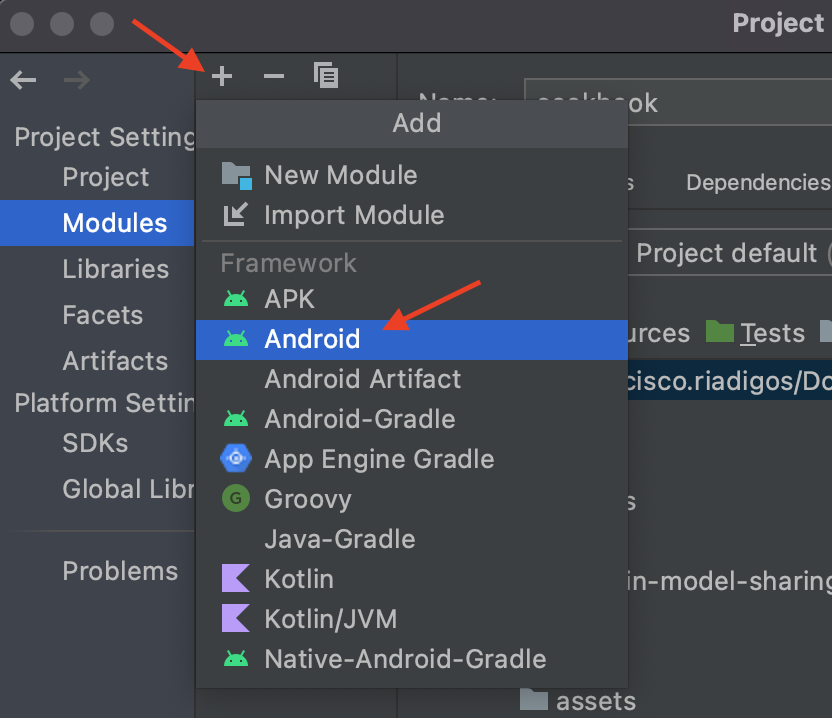
Once the module is created, open the build.gradle file for the newly created adapter module and add PlatformHub dependency and the dependency of the the legacy library in the dependencies section.
gradle
...

dependencies {
    // Platform-hub
    implementation "com.skyrin.mobilebanking:platformhub:<LATEST-VERSION>"

    // Your legacy library dependency here
    // Since the adapter is in the same project as the legacy library, we can use project implementation
    implementation project(":babs")
    implementation project(":babscontract")
}
:::note
An adapter does not necessarily have to be in its own module. The adapter class can be added to the existing legacy library module. This is a hybrid solution and does not require releasing a separate artifact for the adapter.
It is recommended to create a separate module for the adapter if there is no other library or code that depends on the legacy library that is being adopted. This way the legacy library's public interface can be hidden by the adapter and only expose the adapter.
We use implementation for the legacy library to prevent the legacy library to be added as a transitive dependency of the adapter. This way, we can hide the public methods of the legacy library when we use the adapter library.
You can use api instead of implementation if other code still depends on the legacy library to expose the legacy library public interface through the adapter.
:::
In the src/main directory, add an assets directory if it doesn't already exist. Create a policy json file in the assets directory for the adapter (i.e. example-adapter-policy.json). Learn more about plugin policy here
After completing this step, You are ready to implement your adapter class.
Implementing the Adapter Class
To start with, we will be creating the adapter class which will house all the code for calling the public methods from the legacy library and passing any return data through PlatformHub messaging for other Plugins to consume. The adapter class will inherit from Plugin class from PlatformHub. In the case of BaBs it will look something like this:
kotlin
class BalanceAfterBillsPlugin @Inject constructor(
    assetsLoader: AssetsLoader,
    private val balanceAfterBills: BalanceAfterBills // Inject BaBs contract
): Plugin(assetsLoader) {

    override val policyFilename: String
        get() = "POLICY_FILE_NAME.json"

    override fun init(context: Context, configurationFiles: Map<String, InputStream>) {
        // Initialise any configurations here
    }

    override fun publish(eventStream: BaseMessage.EventStream): SharedFlow<EventStreamOutput> {
        return MutableSharedFlow()
    }

    override fun subscribeOnStartup(
        subscription: SharedFlow<EventStreamOutput>,
        eventStream: BaseMessage.EventStream
    ) {

    }

    override fun onReceive(message: BaseMessage.Query): JSONObject {
        return JSONObject()
    }

    override fun onReceive(message: BaseMessage.Command) {

    }
}
The above code snippet is the basic implementation required for the adapter to be used in PlatformHub.
TIP
Only the policyFilename property and the init method are mandatory. The rest of the functions are optional, you only override them if you have defined in your policy to receive that specific message type.
For how to handle navigation in a journey adapter, check here
Receiving and Handling Messages
Sending, receiving and handling messages in your adapter is the same as you would in a normal plugin. Adapters can only send and receive messages declared in their policy file.
TIP
You can read more about messaging here
For adapters, the messages that it can receive are tied to the public methods of the legacy library.
Now that we have the adapter class created, let's look at how we can receive messages and communicate that to legacy library. Let's look at an example from Balance After Bills.
Synchronous Method Call
Most legacy libraries expose synchronous methods in their contract interface to allow the callers to call and get some data back or just call to trigger some action without any return data. PlatformHub provide a way to transform those method calls to messages.
For example, in Balance After Bills there multiple methods define in the contract to get BalanceAfterBillsInfo. The code snippet below shows how we can handle this through PlatformHub messaging:
kotlin
override fun onReceive(message: BaseMessage.Query): JSONObject = when (message.messageName) {
    GetBabsStatus.name -> {
        val result = balanceAfterBills.getStatus()?.let {
            objectToJson(it)
        } ?: "{}"

        JSONObject(result)
    }

    GetBabsLoadingInfo.name -> JSONObject(
        objectToJson(balanceAfterBills.getLoadingInfo())
    )

    GetBabsUnavailableInfo.name -> JSONObject(
        objectToJson(balanceAfterBills.getUnavailableInfo())
    )

    else -> JSONObject()
}
In the above snippet, we are listening to three Query messages in the adapter to call the public methods in the BaBs interface to get some data and return it back to the sender of the message. This transforms the public method of the legacy library to a PlatformHub message which can now be accessed by any other plugin.
Since PlatformHub only allows sending data to other plugins using JSONObject, we get the data from the legacy library and transform it to JSON and send it via PlatformHub.
If the legacy library exposes a method that only triggers some action and doesn't have any return value, then we can use the Command implementation of the onReceive method in the adapter to handle this.
Asynchronous Method Call
A legacy library might have some async public method in their interface to perform some task in the background to get the resulting data from it. To call such methods using the adapter, you can use Command and EventStream pattern. You listen to a command in the adapter that will trigger the method in the legacy library to perform the async operation then once it's done, we send the resulting data back to the sender via PlatformHub event stream which will be subscribed to by the sender. The example snippet below shows how we receive such command and respond with events:
kotlin
override fun onReceive(message: BaseMessage.Command) {
    when (message.messageName) {
        // Listen to the command message and emit the result through a shared flow
        GetBabsInfo.name -> coroutineScope.launch(mainDispatcher) {
            val result = balanceAfterBills.getInfo()
            babsInfoStream.emit(EventStreamOutput(JSONObject(objectToJson(result))))
        }
    }
}
kotlin
override fun publish(eventStream: BaseMessage.EventStream): SharedFlow<EventStreamOutput> {
    return when (eventStream.messageName) {
        // Publish the resulting data to any plugin interested
        BabsInfo.name -> babsInfoStream.asSharedFlow()
        else -> MutableSharedFlow()
    }
}
With this approach, you will have to define the Command in the receive section of the policy then the EventStream in the publish section. The sender will also have to declare in their policy to send the command and subscribeOnStartup to the event stream.
An alternative approach will be to publish the data through event stream and the plugins interested in it will have to subscribe to the data on demand which is more in tune with how the legacy libraries work. With this approach, there is no need for the sender plugin to send a command and listen to the result data via events. They only need to send a message to subscribe on demand and that's it. Below snippet shows an example of how to implement this approach:
kotlin
override fun publish(eventStream: BaseMessage.EventStream): SharedFlow<EventStreamOutput> {
    return when (eventStream.messageName) {
        // Publish the resulting data to any plugin interested
        BabsInfo.name -> flow {
            val result = balanceAfterBills.getInfo()
            emit(EventStreamOutput(JSONObject(objectToJson(result))))
        }.shareIn(coroutineScope, SharingStarted.WhileSubscribed())
        else -> MutableSharedFlow()
    }
}
As you can see with this approach, you only need to implement the publish method and there is no involvement of commands. If you are going with this approach, you will have to make it clear to the consumers that they can only subscribe to this event on-demand. If they subscribe to it on startup, there is no command implementation to trigger refresh. Below is an example of how a consumer will subscribe on demand to this event stream:
kotlin
val sharedFlow = messageSender.subscribeOnDemand(
    BaseMessage.EventStream(
        messageName = BabsInfo.name,
        pluginName = "ExampleAdapterPlugin",
    ),
    subscriber = this
)
The consumer will receive a shared flow from your adapter with the data. In this way there is no command involved.
Conclusion
We have looked at how to implement an adapter to wrap an existing journey or capability library to make it work with the PlatformHub messaging system. If you are adopting an existing library and you are not sure what messages it will be receiving are going to be, you can refer to the contract interface of the library for all the methods and fields that are exposed. This will give you an idea of what the messages should be.
For the specific implementations in the adapter to call the public methods and transform them to the PlatformHub implementation, you can look at how the contracts for the legacy library are currently implemented in the host app using the libraries.
References
You can always have a look at other adapter implementation to learn how you can get started with your implementation.