Appearance
Plugin Accreditation Process
INFO
- The Accreditation Process takes 2 working days on average to be completed: since the time it is raised until the time all the PR comments are addressed and gets approved.
We recommend to raise your accreditation PR having this in consideration. - Only production ready releases are accredited. Do not submit alpha or beta releases for accreditation.
- Only standalone plugins are accredited. App internal plugins do not need accreditation.
- See Common Accreditation PR issues for a list of the most common issues.
To ensure the quality of our Platform we need to make sure all its components meet our quality standards and are implemented following the right architecture and patterns. This document is meant to describe our software quality expectations and the steps and tools used in the process to enforce it. Most expectations are enforced by the accreditation automation checks](plugin_accreditation_process_automation).
To speed things up, raise the accreditation PR, review the automated observations, fix the flagged issues, and then ask the maintainers for review once everything is resolved.
Please see the Common Accreditation PR issues section at the bottom of this page to avoid the making the most common mistakes.
Process
The following process needs to be carried out for every new plugin and for every new version of an already accredited plugin being released.
Once the authors are satisfied a plugin meets all the requirements specified they will seek accreditation by raising a pull request in the platform-accredited-plugins repository. Once all automated observations are addressed, contact the accreditation maintainers for formal approval.
The pull request must contain an addition to plugin-registry.json following the format:
json
{
  "pluginName": "NetworkPlugin",
  "repo": "mobile/platform-network-ios-plugin",
  "versions": [
    {
      "version": "1.0.0",
      "bundleId": "com.skyrin.networkplugin"
    }
  ]
}pluginName: name of the plugin as per its policy filerepo: git repository nameversion: bundle version of the library. Please do not add rc or snapshot version in plugin registry.bundleId: bundle id that identifies your library unequivocally. Please ensure you use a format that is compatible with one of the wildcard provisioning profiles available, so it can be run in a device if needed.
Platform Maintainers will review the plugin providing feedback via the pull request if anything needs to be amended. If a meeting is required to discuss certain topics; the maintainers will let you know.
Reviewers will divide issues into 3 categories:
Critical: Issues that must be fixed for the plugin to be accredited.
Major: Issues that should be fixed, else they will have to be fixed in next version of the plugin.
Minor: Nice to have suggestions, it's up to the developer to implement them.
During review reviewers will add the label REVIEWING to the PR.
If amendments are necessary, reviewers will add CHANGES REQUESTED label.
When all the reviewer's comments are addressed the PR author can add the label COMMENTS ADDRESSED so it can be reviewed again.
If reviewers are not to pick up PR, DO NOT REVIEW label needs to be added.
The ML Team will run tests against all PRs and evaluate performance based on issues raised in aforementioned categories including review / amendment time.
Once the plugin meets all our standards the pull request will be approved and merged, the plugin is now officially accredited and can be released in a production app.
mermaid
flowchart TD
    A(Complete plugin implementation) --> B(Ensure that the plugin has its version in its bundle)
    B --> C(Ensure plugin meets standards)
    C --> D(Raise a PR in platform-accredited-plugins)
    D  --> E(Close automated observations and request maintainers for review)
    E --> F(Platform Maintainers plugin review)
    F --> G(Plugin accredited & ready to be released)
Repo Standards
+ README.md
The plugin's GitHub repository must contain a README.md file explaining the plugin's functionality and how to use it. It must also contain a link to its demo/sample app in TestFairy, minimum supported OS versions requirements and documentation links.
+ Demo/Sample app
Every plugin project must have a demo/sample app which thoroughly showcases every functionality of the plugin. This applies to any plugin, including plugins without any views such as domain model plugins or capability plugins. For such plugins without views, a simple UI must be implemented in the demo/sample app to showcase its features, including unhappy paths (error handling).
The latest version of this demo app must always be present in TestFairy so people can easily download it in their devices.
+ Uses our shared CI pipeline
To ensure the code in your repo passes our quality checks and standards, your Git repository needs to be integrated with our infrastructure CI pipeline.
Plugins Standards
For a plugin to be accredited, it must meet the standards below.
+ Documentation
The plugin must be fully documented.
If it's a Platform plugin it needs to be documented in our Readme documentation repository under the section Products.
On the other hand, if it is an GMX specific plugin, it will have to be documented in the GMX-Standards repository under the section App Plugins.
+ Versioning
The plugin's version follows our version standards.
The version stated in the plugins-registry.json in this PR is aligned with framework's/module's version:
- iOS: BUNDLE_VERSION_SHORT.
- Android: versionName in plugin module's build.gradle.
+ Naming
Plugin framework/module naming
The plugin's framework/module name convention can be seen here
Plugin naming
In the Policy.json and other files referencing the plugin class name (such as PluginsConfiguration.json in iOS).
The plugin's name convention can be seen here
Messages naming
The Messages name convention can be seen here
+ Policy
A plugin's policy must contain every message a plugin sends/emits and receives/subscribes to. More info about Policies can be found here
+ Messages are used with the correct intent
Each message type defined in PlatformHub must have a clear purpose and intent. We must make sure we use these messages in the right way since they describe our intentions in the code and improve readability when used correctly. More info about the different types of messages and their use can be found here
+ Message payloads
Messages' payloads must be data structures containing strictly primitive data types (strings, ints, booleans, etc). No complex objects are allowed to be passed or serialised into strings to embed them in a payload.
✅ Do:
json
{
  "someKey": "some value",
  "someArray": [
    {
      "someNumber": 12,
      "someBool": true
    },
    {
      "someNumber": 0.8,
      "someBool": false
    }
  ]
}
❌ Don't:
json
{
  "imageName": "image",
  "imageExtension": "jpeg",
  "imageDataSerialised": "AQAPcAAAAAACEyRzQ8RzMzZzc2bjk5cjw7eD4+fUhNVktbcVJidltqfRE7oTE5mDMj1ZexFxdwVxdwmVkw2BjyWdmzGxrz2xr0W5t03Bv0XJx13V003Z11Hd23Ht61nx713p53/wC/IGA2oSD24iH3YuK34GA5oeG7I+O4IqJ74+O847zByr3K4cTIzsbR5c7Z6dLb6tTd7Njg7d7l8ODn8eru9vb4+////AAAAAAAAAAAAAAAAAAAAAAAAAAAAAAAAAAAAAAAAAAAAAAAAAAAAAAAAAAAAAAAAAAAAAAAAAAACwAAAAAEAAQAAAI2AB3CBxIsKBALly2YKkyJckRIT544KgxQ+AWME3aaNzYho0IEyYEXgEzhKNGNmsuDCAhkAoYICZRprGgY4RAJWBucJRpRgKNDgKRgJGxkScZCC84CDQC5sXJNWnMkBHDgMUGgT++eH"
}
+ Use JSON Schemas
Every plugin must define a JSON Schema for each one of the payloads it can send or receive in its messages. These JSON schemas will serve as the payload documentation and also for validation of the data exchanged with other plugins in an app. More information about schemas and how to create schemas can be found here:
To know more about how to use platform-hub-tools, please go through its Readme.
+ Public Interface
The only public interface a plugin can expose is the implementation of the Plugin Protocol defined in PlatformHub. This ensures the only way to communicate with a plugin is via PlatformHub, making it unnecessary for other libraries to import the plugin to communicate with it (this reinforces the previous point).
+ Initialization
To speed up its startup process, PlatformHub initialises all the plugins in parallel using multiple background queues.
Plugins must not expect they are going to be initialised in the main thread. Furthermore, they should not run any process in the main thread as part of their initialisation logic. Examples of bad praxis:
- Initialising their Redux store in the main thread. This is not necessary, the store can be initialised in a background thread without issue.
- Creating views as part of a plugin's
initmethod is inefficient. Views must only be created when they are going to be displayed to the user, in the case of a plugin, this would be when it receives a view query.
Code Quality Standards
+ Architecture
The plugin's architecture aligns with the WPB Mobile tech strategy, meaning:
- Doesn't use of web journeys.
- Doesn't use of Angular/React/Flutter/Cordova.
- Uses official Redux support lib: iOS, Android. No custom Redux implementation is allowed.
The plugin's architectural solution must have been previously reviewed by an architect or agreed in a Mobile Platform Clinic meeting. Evidence of this agreement must be presented in the accreditation PR.
+ Dependencies
PlatformHub, IconManager, ThemeManager and PlatformRedux dependencies
Plugin's libraries must only have allowed internal dependencies and these are:
For implementation details regarding IconManager & ThemeManager see here. If a plugin needs resources or needs to communicate with any other plugin this must be done via PlatformHub. Therefore, the mobile-ci.json must specify PlatformHubKit, IconManager, ThemeManager or PlatformRedux as their only release dependencies. Here's full list that should not mark "development_only": true in mobile-ci.json if your plugin (not your plugin's sample app) is using them.
- PlatformHubKit
- PlatformIconsManager
- PlatformThemeManager
- PlatformRedux
- SKYRINIcons
- HASEIcons
- FDIcons
- MSBIcons
- SKYRINThemeAssets
- HASEThemeAssets
- NSThemeAssets
- GPBThemeAssets
- FDThemeAssets
- MSBThemeAssets
- BOTFThemeAssets
**Note: **
- Do not embed dependencies into project. They should be supplied by host app to the plugin and
Other 3rd party libraries and SDKs
Any other dependencies must be declared in mobile-ci.json, marked as "development_only": true and only used for testing purposes in the plugin's sample app.
External dependencies to 3rd party libraries and SDKs may be permitted but will have to be a clear and valid justification for it. Such dependencies will be captured by ios-dependencies automation script for iOS platform and should be added as "exception_libraries" in plugin registry file for that plugin as shown below: 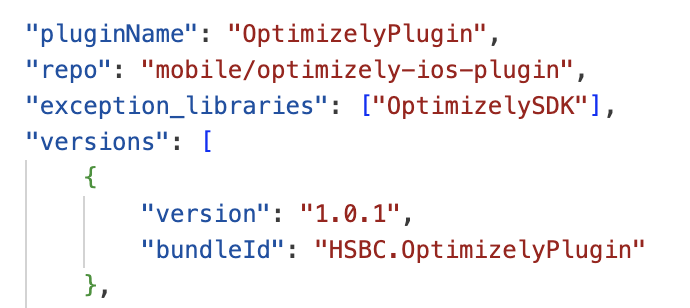
:::note
This point doesn't apply to Adapter Plugins since their legacy code may import some internal libraries. If this is the case you will need to provide context on when and how you are planning to remove those dependencies.
:::
+ Testing & Code Quality Assurance
All tests must use mocked data and no server side calls would be taking place during the testing.
Unit Test
Unit Test must cover at least 90% of the plugin's logic.
Performance tests
Those algorithms subject to have a performance impact in the app must be tested and an acceptable performance benchmark established.
SonarQube
- Class "A" rating: Code maintainability, reliability, security and security review on SonarQube must have an "A" rating.
- 90% coverage: A plugin must be thoroughly tested to ensure its total test coverage is at least 90%. This will be automatically checked in our CI pipelines by SonarQube, therefore your plugin repository must be configured and integrated to run SonarQube in our shared CI pipelines.
- Less than 5% code duplication.
- The plugin's repo is configure to use the correct SonarQube quality gate:
Checkmarxs
The plugin repository must be integrated with Checkmarx so every time it is run in the shared CI pipelines a Checkmarx security report is produced. There must not be any security vulnerabilities in the plugin code.
A security test report - SAST - must be provided for the review. It mus contain no Critical or High issues (screenshot/PDF to be provided).
Dependabot
The plugin's repo must not have any Dependabot alerts in its Security tab.
Code Reviews
To ensure code quality, every pull request in the plugin's repo must have been code reviewed. To verify this, filter the PR with is:pr review:none is:merged. If there is any PR that has not been reviewed it will need to be retrospectively reviewed, once done, please add the label Post-Merge Approved to the PR so it can be can be filtered out in the future.
Journey Plugin specific standards
+ Declarative UI
New plugins must use declarative UI (SwiftUI , Jetpack / Compose).
+ Redux
Our platform follows a reactive architecture, therefore any new Journey plugin managing internal state MUST implement a redux architecture using our Composable Architecture library - iOS, Android.
A Redux implementation example can be found here.
Please see below for guidance per plugin type:
| Type | Example | Internal Plugin Architecture |
|---|---|---|
| Journey Plugin | AccountsJourneyPlugin | MUST use Redux |
| DomainModel Plugin | AccountsDomainModelPlugin | May use PlatformRedux if manages internal state |
| Capability Plugin | NetworkPlugin | May use PlatformRedux if manages internal state |
| Adapter Plugin | AccountsAdapterPlugin | Redux is not required |
:::note
This doesn't apply to Adapter Plugins since their legacy code already would have a pre-existing internal architecture.
:::
+ UI Tests
UI tests must be added to every flow a plugin journey contains.
Domain Model Plugin specific standards
+ Domain Model Plugins always publish new values
When holding state, the Domain Model Plugins must ensure they always publish the values of a state whenever it gets updated, even if the new state contains the exact same value as there was before. This way it will feedback to other plugins that a data update has taken place, even if the values remain the same, so they have the chance to dismiss loading spinners or any other relevant user interface operations.
Apps Standards
Apps won't necessarily be reviewed by the Platform Maintainers but the following guidelines must be followed:
+ PlatformHubPluginsConfig in iOS
In iOS all the plugins initialised by PH must be detailed in PlatformHubPluginsConfig.json.
+ AppPlugin
A plugin called AppPlugin in the host app bundle must always exist and will be the bridge between the application code provided by the OS and the PH ecosystem.
+ AppPlugin sends the 1st message to Platform Hub
AppPlugin should always send the very 1st message in the PlatformHub ecosystem of the app. This will typically happen when the Application/AppDelegate gives us control of the execution of the app (i.e. ApplicationDidFinishLaunchingWithOptions in iOS).
+ Use PlatformHub tooling
Every application must add the latest version of platform-hub-tools as a dependency in mobile-ci.json and utilise this tool for validating schemas.
Common Accreditation PR issues
Please review your PR before submitting for accreditation to ensure you have reviewed for the following:
- The plugin's messages names follow our guidelines. This includes the name of the message must express its intend (e.g. Event Streams must be in past participle to express it is sending a notification of something that has already happened).
- Schemas must be created for each message defined in the policy of the plugin. For further details, see the following links:
- The only public interface in your library must be the one defined by PlatformHub's
PluginProtocolfor iOS orPlugininterface for Android. See their latest implementations here for iOS and Android. - Versioning & release:
- Only production ready releases are accredited. Do not submit release candidate, alpha or beta releases for accreditation.
- The UUID field in the plugin's policy file has been deprecated and can be deleted. Your accreditation PR must now state your plugin's bundle Id. Our accreditation process does not rely anymore in the plugin policy's UUID to identify unequivocally a plugin, now we use its bundle ID and bundle version.
- Make sure the bundle identifier for your plugin follows our convention so it can be provisioned by our wildcards provisioning profiles (i.e.
com.skyrin.LibraryName). - Make sure the version of your framework (in iOS: BUNDLE*VERSION) follows the convention described in our version semantics.
- Documentation:
- When referring to another component or part of the documentation make sure you link the text to it.
- Please review your links are not pointing to temporary URLs like links to Git feature branches; they will result into a broken link once that branch gets merged and/or deleted.
- When linking to a code file in Git, point to a specific release tag or commit. Linking to a branch such as
developormastereventually may result in a broken link as code evolves with time and the file we are linking to may be deleted or renamed in the future. - Ensure the README.md in your repository includes instructions on how to use the plugin.
- Do not duplicate documentation in your README.md, instead just provide a link to the relevant documentation in our Readme repo.
- PH plugins must not import other internal libraries like
mobile-corebut must communicate with other plugins that provide the functionalities that are needed via messages. (For Android, there is a navigation capability library available for PlatformHub). - A plugin must be in its own module or target, do not host and release multiple plugins from the same module/target. This way plugins won't be coupled and we will be able to release them individually.
- Receive and Publish messages are always messages owned by the plugin itself, so in the plugin's Policy, the
pluginNamefield for these messaged can be omitted as it would be redundant. - A plugin can not subscribe to its own messages.