Appearance
Consuming plugins
How to consume and interact with other Plugins via PlatformHub? Here are the basics.
Setup configurations (if any)
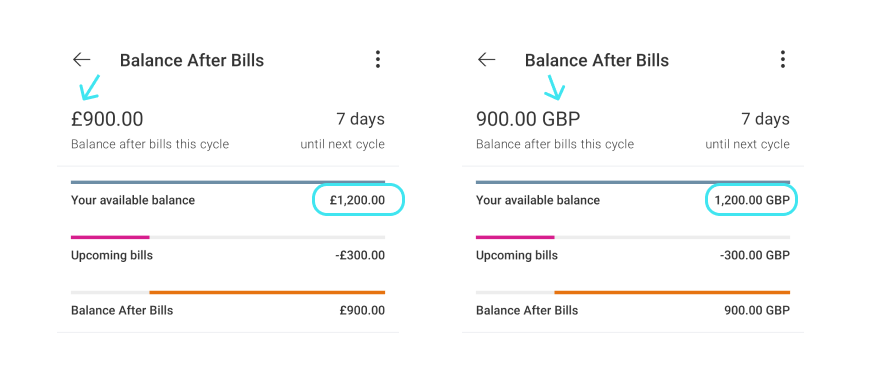
Some plugins may expose to consumers the ability to change their behaviour like:
returning currencies in a specific format
enabling some capabilities like "screenshots"
displaying views with a specific style
etc.
If you want to enable certain configurations in a Plugin, follow these steps:
Locate the Host App (your main
appmodule)Navigate to
src/mainCreate a folder called
assetsif it doesn't exist (optional)Create a
.jsonfile and name it as{plugin-name-in-lower-case}-plugin-configuration.jsonAdd your configurations as
key:valuepairs into anJSONObject:json// /main/assets/{plugin-name-in-lower-case}-plugin-configuration.json { "allowScreenShot": true, "currencySymbol": true // ... // [key]: [value], }Open
PlatformHubInitializerclass and apply your configuration:kotlin// ./app/src/main/.../[your_app]/PlatformHubInitializer.kt // ... @Inject lateinit var platformHub: PlatformHub @Inject lateinit var `nameOfPlugin`: `NameOfPlugin` // Add a configuration for {plugin name} override val plugins: List<Pair<Plugin, Map<String, InputStream>>> get() = listOf( Pair( `nameOfPlugin`, mapOf( "{plugin-name-in-lower-case}Config" to assets.open( "{plugin-name-in-lower-case}" + "-plugin-configuration.json" ) ) ) ) // ... fun setup() { platformHub.init(context, this) }
## Navigate to a specific Screen of a Plugin

Some of the plugins, specially <mark>Journey Libraries</mark>, can expose specific screens that any consumer can open as part of their own lifecycle.

Follow these steps to navigate to a plugin screen:

1. Setup the screen event names you want in the [Policy File]():

   Read this article [> Messages](../common/messages.md) to learn more.

2. Create an `enum class Events` in your **Plugin** class, and add the names of the screens you would like to have access to:

```kotlin
   class `NameOfPlugin` : Plugin {

       // ...

       enum class Messages {
           ShowPluginScreenOne,
           // ...
       }
}- Open the screen using the
MessageSenderinstance from theAppPlugin:
kotlin
    plugin.messageSender.requestNavigation(
          navigationRequest = ActivityNavigationRequest(
             messageName = "ShowHelloWorldScreen",
            pluginName = "HelloWorldPlugin"
         ),
         plugin = plugin
      ).let { it as? ActivityNavigationResponse }
           ?.also { startActivity(it.intent(requireContext(), null)) }
Listening to events
To start listening an event, event subscription should be defined in the policy file as first step.
json
{
    "name": "MessageListenerPlugin",
    "subscribeOnStartup": {
        "eventStreams": [
            {
                "messageName": "MessageToSubscribe",
                "pluginName": "MessageOwnerPlugin"
            }
        ]
    },
After defining an event subscription, we are ready to get event notifications over a SharedFlow. Please note that, this function is called only once when plugin registers an event stream. Subscription is scoped by subscriber (Ex: Coroutine scope, view model scope or unscoped)
kotlin
override fun subscribeOnStartup(
        subscription: SharedFlow<EventStreamOutput>,
        eventStream: BaseMessage.EventStream
    ) {
        when (eventStream.messageName) {
            "MessageToSubscribe" -> {
                subscription.onEach {
                    // Handle events delivered over a `SharedFlow`.
                }.launchIn(coroutineScope)
            }
        }
    }
Performing a query
Query calls in platform-hub is syncronous by default. So, developers should be aware of implications. Query definitions should go in policy files.
json
{
    "name": "QueryCallerPlugin",
    "send": {
        "queries": [
            {
                "messageName": "ExampleQueryName",
                "pluginName": "QueryHandlerPlugin"
            }
        ]
    },
and now, we are ready to call a query by using MessageSender.
kotlin
btnQuery.setOnClickListener {
    val result = plugin.messageSender.send(
        BaseMessage.Query(
            messageName = "ExampleQueryName",
            pluginName = "QueryHandlerPlugin"
        ),
        plugin
    )
    tvName.text = result.getString(NAME_KEY)
}
Performing a command call
Commands are used to communicate asyncronously between plugins. One plugin can request to load data and expect response as event streams. In the example below, AccountJourneyPlugin sends a command to AccountDomainPlugin to load account detail which is returned in AccountDetailLoaded event stream.
json
{
    "name": "AccountJourneyPlugin",
    "subscribeOnStartup": {
        "eventStreams": [
            {
                "messageName": "AccountDetailLoaded",
                "pluginName": "AccountDomainPlugin"
            }
            ]
    },
    "send": {
        "commands": [
            {
                "messageName": "LoadAccountDetail",
                "pluginName": "AccountDomainPlugin"
            }
        ]
    }
    ...
kotlin
btnLoad.setOnClickListener {
    plugin.messageSender.send(
        BaseMessage.Command(
            messageName = "LoadAccountDetail",
            pluginName = "AccountDomainPlugin"
        ),
        plugin
    )
}
kotlin
override fun subscribeOnStartup(
    subscription: SharedFlow<EventStreamOutput>,
    eventStream: BaseMessage.EventStream
) {
    when (eventStream.messageName) {
        "AccountDetailLoaded" -> {
            subscription.onEach {
                // Handle event stream to extract account detail
            }.launchIn(coroutineScope)
        }
    }
}