Appearance
Android architecture using Redux
These guidelines are an ongoing work that may be subject to changes at any time.
⚠️ Please, review this page frequently to see the most updated version.
ℹ️ If you are not familiar with JetPack Compose or Redux, please read some the following articles first:
In this page:
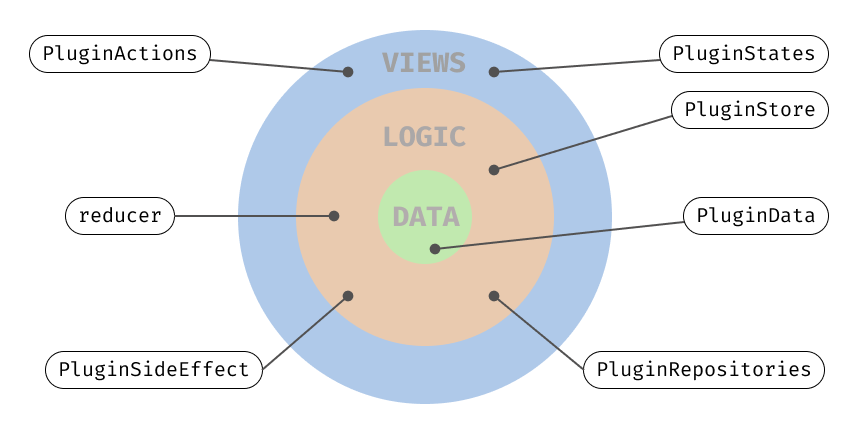
A representation of where all elements of the Redux approach sit by layers:
Hello world with Redux
Learn more...
kotlin
@Composable
fun HelloWorld(
    navController: NavHostController,
    store: Store
) {
    // You retrieve the state of your view from the store
    val state = store.myState.value

    Scaffold(topBar = { AppBar() }) {
        when {
            // Based on its state, for example, you can show one
            // or another screen.
            state.loading -> ShimmerListView()
            state.errorMessage.isNotEmpty() -> Text(text = state.errorMessage)
            else -> ListView(navController, state.data)
        }
    }
}
Business logic with States, Data and Repositories
ℹ️ These are normally the elements you will use to fetch some
Dataand update theStateof theViewwith it.
Learn more...
kotlin
// It is recommended that you have a class called YourPluginNameState,
// which contains other sub states you will use through out your plugin.
data class PluginState(
    val myDetailScreenState: DetailScreenState = DetailScreenState(),
    val myAnimationsState: AnimationState = AnimationState()
    // ...
)

// You can create and handle different states
// - One can be unique for a screen
// - Another can hold some data
// - Another responsible for animations
// - etc.
data class DetailScreenState(
    val loading: Boolean = false,
    val data: List<PluginData> = emptyList(),
    val errorMessage: String = ""
)
// ...

// Your actual data classes
data class PluginData(
    val name: String,
    val number: String,
    val balance: Double
    // ...
)
// ...

// All classes, like Rpositories, Services, Preferences, etc.
// will all be used inside a SideEffect.
class PluginRepositoryImpl(
    @IoDispatcher private val ioDispatcher: CoroutineDispatcher,
    private val someDataSource: SomeDataSource
) : PluginRepository {}
Managing the Store with reducers
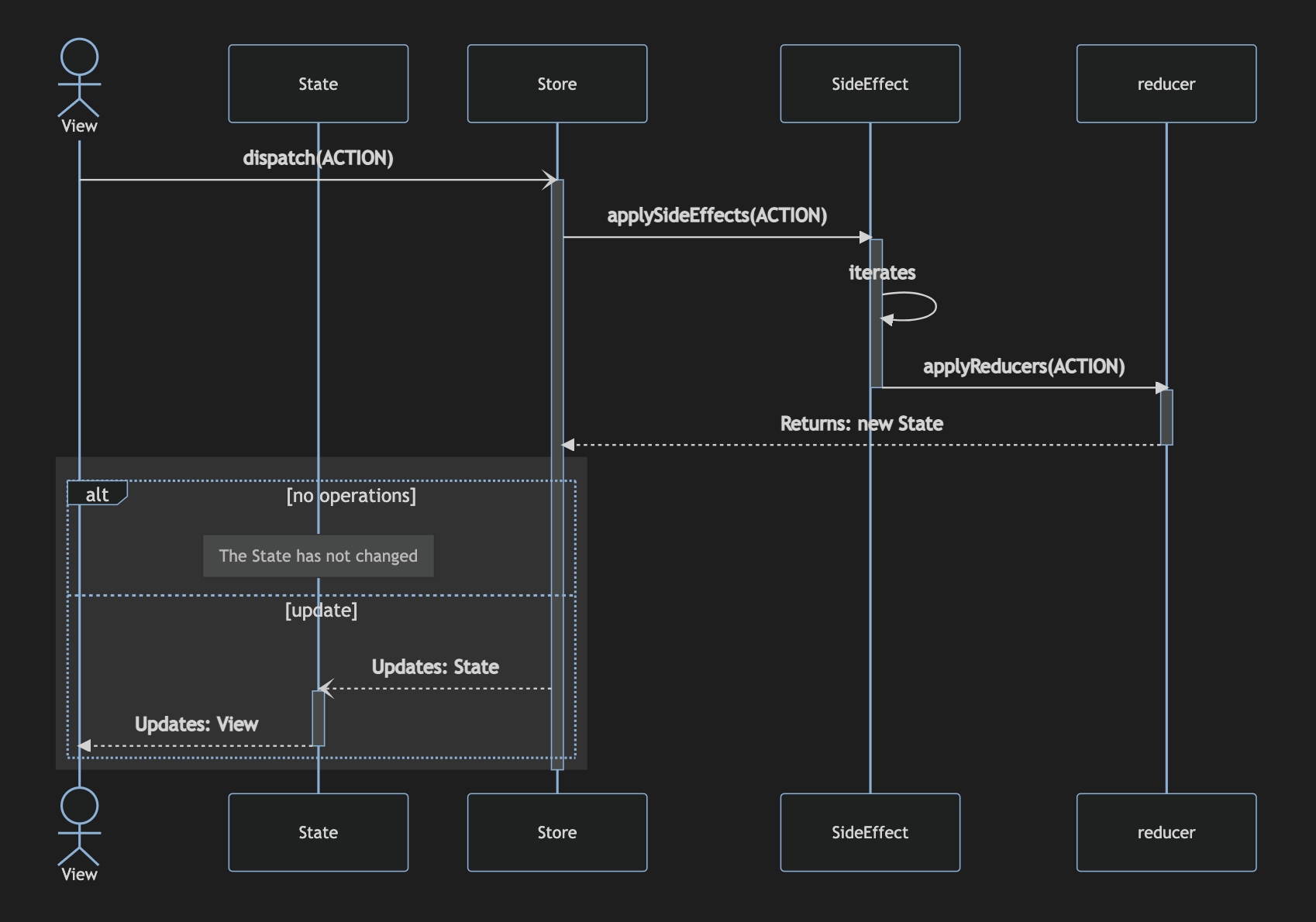
ℹ️ An example on how the
Storemanages theStates when anActionis dispatched to thereducer.
Learn more...
kotlin
// A reducer receives Actions and updates the State in the Store.
fun reducer(state: PluginState, action: Action): PluginState =
    when (action) {
        is Loading -> state.copy(
            myState = MyState(loading = true)
        )
        is Loaded -> state.copy(
            myState = MyState(
                loading = false,
                data = state.data
            )
        )
        else -> state
    }

// A centralised object called the Single Source Of Truth.
val store = PluginStore(
    reducers = listOf(::reduceOne, ::reduceAnother),
    sideEffects = listOf(
        OneSideEffect(repository, coroutineScope, mainDispatcher),
        AnotherSideEffect(repository, coroutineScope, mainDispatcher)
    )
)
Mermaid graph
mermaid
sequenceDiagram
    actor View
    participant State
    participant Store
    participant SideEffect
    participant reducer
    View-)Store: dispatch(ACTION)
    activate Store
    Store->>+SideEffect: applySideEffects(ACTION)
    activate SideEffect
    SideEffect->>SideEffect: iterates
    SideEffect->>+reducer: applyReducers(ACTION)
    deactivate SideEffect
    reducer->>reducer: iterates
    reducer-->>-Store: Returns: new State
    rect rgb(50, 50, 51)
    alt no operations
        note over State: The State has not changed
    else update
        Store--)State: Updates: State
        activate State
        State-->>View: Updates: View
        deactivate State
    end
    end
    deactivate Store
Handling operations in a SideEffect
Learn more...
kotlin
// All your business logic should be written in a SideEffect class.
// You can have multiple SideEffect classes for different uses.
class DetailScreenSideEffect(
    private val repository: Repository,
    private val coroutineScope: CoroutineScope,
    @MainDispatcher private val mainDispatcher: CoroutineDispatcher,
) : SideEffect<PluginState> {

    override fun invoke(
        state: PluginState,
        action: Action,
        dispatch: Dispatch,
        next: Next<PluginState>
    ): Action = when (action) {

        is FetchDetailsAction -> {
            // Perform here any async operation
            //
            FetchDetailsLoadingAction
        }

        else -> next(state, action, dispatch)

    }
}
Sending Actions and reacting to changes
Learn more...
kotlin
// You can perform actions by using the store.dispatch() method,
// and passing an Action.
Button(onClick = { store.dispatch(MyAction) }) {
    Text(text = "Perform action")
}

// Some views will be already bound to the state data, so there is no need to update them.
Text(text = store.state.data.property)